Before you start
- The quarter's entries recorded and confirmed: the 303 is built from them, and whatever is missing does not show in the figures.
- Knowing how this modelo is filed: Settings › How returns are filed says so, modelo by modelo. For Trimestria to file, after your confirmation or automatically, you need the apoderamiento in force (How to give Trimestria the apoderamiento at the AEAT's Sede), the second factor on the holder's account and the holder of the business proved. Automatic filing also needs an email of the holder that receives our messages.
- To file it yourself from the browser, your own digital certificate and the Trimestria extension on a computer. This way is offered only while no apoderamiento files this return for you and you have not chosen «Preparing the document only».
- To file it yourself at the Sede, your certificate, your DNIe or your Cl@ve; if you have none of them: How to get Cl@ve, even without going to an office.
- The deadline at hand: the 1st to the 20th of April, July and October, and the 1st to the 30th of January for the fourth quarter; if the last day is not a working day it moves to the next one that is. If the return is to pay and you want to direct-debit it, the direct-debit deadline ends earlier.
The steps
If Trimestria files it after your confirmation
Open Returns, open the quarter's modelo 303 and press Prepare.
Preparing freezes the return as it is: figures, entries and the day's rules. It files and pays nothing.
Check the figures before you confirm anything. Under How the result adds up open each casilla to see which entries, documents and rules it comes from, and look above all at the
71, the result.The Agencia's validator checks the shape and coherence of the file, never that the amounts are right. Only you can check that.
AEATThe 303's form, in the Agencia's helpThe official page explains it with its own screenshots. We link to it rather than copy them. Page updated on Open at the Sede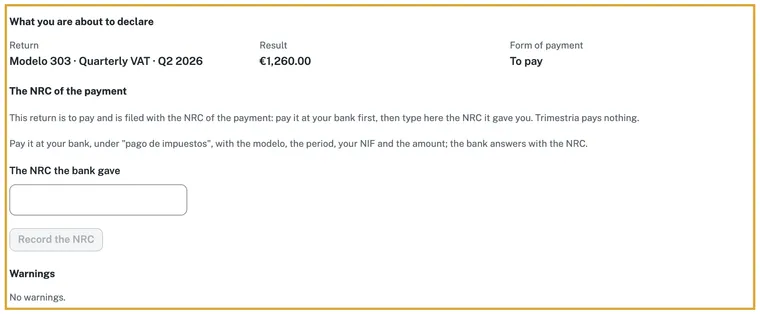
What you are about to declare, before confirming. Screenshot of the application on a test environment, retaken with each version. If the result is to pay, choose under The way of paying how it is paid:
AEATThe direct-debit deadlines, in the Agencia's helpThe official page explains it with its own screenshots. We link to it rather than copy them. Page updated on Open at the SedeIf you choose direct debit, press Record this way of paying and confirm it is you; without recording it, the file is written with the NRC.
Once the file is written, the way of paying is fixed in it. To change it the return has to be prepared again.
Press Write the file. If it asks, complete the details of who files. When the validator accepts the shape, the card says «Check passed»: the return is ready to confirm and nothing has been filed yet.
If the result is to pay with an NRC, pay it at your bank, under «pago de impuestos», with the modelo, the period, your NIF and the amount, and type the NRC into The NRC the bank gave. Press Record the NRC.
The NRC is a 22-character code that the bank or the Sede's payment gateway gives as the proof of the payment. Trimestria pays nothing for you.
AEATThe NRC, in the Agencia's helpThe official page explains it with its own screenshots. We link to it rather than copy them. Page updated on Open at the SedeTick «I have read these figures and I declare them as mine» and press Confirm. Then press Send through the channel's name and confirm it is you with the code from your authenticator app.
Wait for the channel to answer: the card says the channel accepted it, with its CSV, its registration number and its time. We write to you by email, with a link to the return, and the Agencia's receipt appears on the same card when it arrives; download it with Download the receipt.
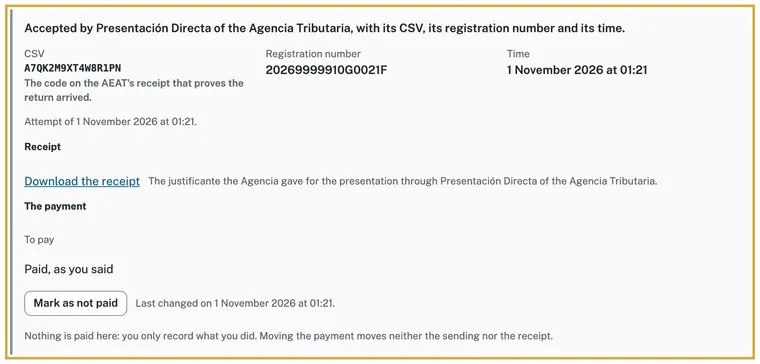
The accepted filing, with its CSV and its receipt. Screenshot of the application on a test environment, retaken with each version.
If Trimestria files it automatically
Open Returns, open the quarter's modelo 303 and press Prepare. Preparing freezes the return as it is and files and pays nothing.
Check the figures: under How the result adds up open each casilla to see which entries it comes from, and look above all at the
71, the result.If it is to pay, choose under The way of paying how it is paid, before writing the file: your bank's NRC or the direct debit. If you choose direct debit, press Record this way of paying and confirm it is you. Then press Write the file.
When the validator accepts the shape of the file, Trimestria writes to you with the amounts and the deadline, with a link to the return. Open it and check the return. The automatic way holds only if the file is written ten days or more before the last day of the deadline; if it no longer fits, the filing card says so and the return waits for you to confirm it, as in the first way.
From the moment the email reaches you, you have seven days to check it and stop it with Cancel the automatic filing. Choosing automatic filing is an express consent that you give modelo by modelo in Settings › How returns are filed, by ticking the box of its text: without the tick it does not turn on, and you withdraw it by choosing another way of filing. It is your consent in advance, completed by the data we show you, not by your silence.
If you pay with an NRC, pay it at your bank and record it on the return, under The NRC the bank gave. With direct debit you pay nothing apart: the Agencia charges the account you chose.
Without the NRC the return leaves the automatic way and waits for you to file it.
AEATThe NRC, in the Agencia's helpThe official page explains it with its own screenshots. We link to it rather than copy them. Page updated on Open at the SedeIf you do not stop it, Trimestria files it by itself when the seven days end, always before the deadline, and, when the channel accepts it, writes to you with the CSV and a link to the return.
Open the return and download the receipt with Download the receipt when it appears. It is the proof that the return is filed.
If you file it yourself from the browser
Open Returns, open the quarter's modelo 303 and press Prepare. Preparing freezes the return as it is and files and pays nothing.
Check the figures: under How the result adds up open each casilla to see which entries it comes from, and look above all at the
71, the result.If it is to pay, choose under The way of paying how it is paid, before writing the file: your bank's NRC or the direct debit. If you choose direct debit, press Record this way of paying and confirm it is you. Then press Write the file.
If it is the first time, press Install the extension. The extension only carries this page's file to the Agencia: it does not read your certificate and does not decide anything.
This way works only from a computer. If Trimestria does not offer it, read on the return's page why: your apoderamiento already files it for you, you chose to only prepare, or the Agencia is not available from here.
If it is to pay with an NRC, type it and press Record the NRC; tick the box that says you file in your own name.
Press File from my browser and confirm with the second factor. Your browser opens a tab of the Agencia: choose your certificate there, and the tab closes by itself.
Sign out of the Sede first: a session left open there can turn the answer into its error page. The Agencia can take up to four minutes to answer.
When the channel answers, the card says the channel accepted it, with its CSV and its registration number. Download the receipt with Download the receipt.
If you file it yourself at the Sede
Open Returns, open the quarter's modelo 303 and press Prepare. Preparing freezes the return as it is and files and pays nothing.
Check the figures: under How the result adds up open each casilla to see which entries it comes from, and look above all at the
71, the result.If it is to pay, choose under The way of paying how it is paid, before writing the file; if you choose direct debit, press Record this way of paying and confirm it is you. Press Write the file and, when the validator accepts the shape, Download the file. You can also take the PDF draft with Download the PDF to compare the figures; it is not valid for filing.
Enter the Agencia Tributaria's Sede with your certificate, your DNIe or your Cl@ve and open the procedure «Modelo 303. Ejercicio» with your return's year, «Presentación y servicio de ayuda Pre303».
AEATThe modelo 303 procedure, at the Agencia's SedeThe official page explains it with its own screenshots. We link to it rather than copy them. Page updated on Open at the SedeFill in the NIF, the name and the period, and press Confirmar. In the census window choose Continuar con la presentación del modelo 303. In the initial window choose Importar and select the file you downloaded.
Press Validar declaración and fix the errors it shows; warnings do not stop you from filing. Then press Presentar declaración and choose how the result is paid.
Press Firmar y enviar, check the summary, tick Conforme and press Firmar y enviar again. Keep the filing receipt, which carries the CSV.
If you pay with an NRC, pay first and type it into its box before Firmar y enviar.
Go back to Trimestria, open the return and press I filed it at the sede. Note the receipt's CSV, 16 letters and digits, and the day of filing, and press Record it as filed. This way Trimestria does not offer it to send again.
If something does not add up
The Agencia rejects the return
The filing card tells you why in the channel's own words, and the return can be sent again. Fix what it asks, prepare the return again if the figures change and confirm again. If the rejection says it is already filed, do not send it again: Trimestria will not.
We do not know whether it arrived
If the card says we do not know whether it arrived, do not send it again: a query to the Agencia will settle it. Meanwhile Trimestria holds another send for a few minutes.
The result is negative
A negative return is filed «a compensar»: the quota carries over to the following quarters in the casilla 87, and it is not refunded at once. Only in the last return of the year, the fourth quarter's, can a refund be asked for instead of compensating.
I missed the deadline
File as soon as you can. On the automatic way, if the deadline passes before the send nothing is sent and the return waits for you to file it. A return filed late, with no earlier request from the Agencia, carries a surcharge of 1 % plus 1 % for each full month of delay, on what is to be paid; after twelve months it is 15 %, with late-payment interest from then on.
I chose direct debit and it has closed
If the direct debit closed before the send, nothing is sent: prepare the return again and choose another way of paying, for example the NRC. You are still inside the filing deadline, which ends a few days later.
I filed only the 303 and the 130 is missing
If your activity also pays the modelo 130, it is another return, with its own casillas: Trimestria prepares it separately and each is filed and accepted on its own. Check in Returns that the 130 of the same quarter is also filed.
I made a mistake in a 303 already filed
From the third quarter of 2024 it is corrected by filing the modelo 303 itself again with the box of rectifying self-assessment ticked. If the mistake is VAT charged too high, you cannot: the invoice has to be corrected too.
I had no activity this quarter
It is filed too: a quarter with no quotas accrued or borne is filed «sin actividad». Trimestria prepares it all the same and it is filed like any other.
Afterwards
With the receipt saved, the return stands filed in your account, with its CSV and its registration number; it is not offered to send again. For the next quarter, repeat from Returns. If you change how returns are filed, Settings › How returns are filed keeps the choice and its text.
Sources
- Agencia Tributaria · Modelo 303 - Ayuda técnica, presentación electrónica mediante formulario web · Page updated on
- Agencia Tributaria · Modelo 303. IVA. Autoliquidación (procedimiento G414) · Page updated on
- Agencia Tributaria · Plazo de presentación del modelo 303 · Page updated on
- Agencia Tributaria · Plazos de presentación de autoliquidaciones con domiciliación bancaria · Page updated on
- Agencia Tributaria · Pago de autoliquidaciones mediante cargo en cuenta. Obtención de un NRC · Page updated on
- Agencia Tributaria · Modelo 303 - Instrucciones 2026 · Page updated on
- Agencia Tributaria · Errores en la declaración del modelo 303 · Page updated on
- Agencia Tributaria · Liquidación de recargos por presentación fuera de plazo de declaraciones y autoliquidaciones · Page updated on
- BOE · Ley 58/2003, General Tributaria, artículo 27, recargos por declaración extemporánea sin requerimiento previo · Page updated on
We cite the source and the date the Agencia gives, as its terms of reuse ask.