Before you start
- Your digital certificate, your DNIe or your Cl@ve. If you have none of them: How to get Cl@ve, even without going to an office.
- If you have not yet proved that you hold the business, open Settings › Prove you hold the business first and choose With my apoderamiento: this very power proves it, even if you only have Cl@ve. That screen opens an attempt of 24 hours, and the power has to be granted within it.
- Trimestria's NIF, which the application shows you on that screen or in Settings › Filing in your name: have it copied.
- Ten minutes, and the list of trámites of this guide at hand.
The steps
Enter the Agencia Tributaria's Sede and open Apoderamientos › Alta de poder para trámites tributarios específicos.
AEATThis screen, in the Agencia's own helpThe official page explains it with its own screenshots. We link to it rather than copy them. Page updated on Open at the SedeIdentify yourself with your certificado, your DNIe or your Cl@ve.
The Agencia's page does not say which level of Cl@ve this trámite requires. If the Sede does not let you go on with your Cl@ve, a digital certificate does.
Type the NIF del apoderado: Trimestria's, as the application shows it.
Tick the trámites Trimestria asks for, and only those. They are the filing and the consultation of every modelo it prepares for you:
303P303C130P130C390P390C349P349C036P036S030PGENERALNOT111P111C115P115C190P190C180P180C100PThe list is the one you see in the application in Settings › Filing in your name; this guide repeats it so you have it in front of you.
Leave the fecha de fin as it is, five years, the longest the Agencia allows, or shorten it.
Press Firmar y Enviar, check the summary, then press Conforme and Firmar y Enviar again.
If you ticked
GENERALNOT, the notifications, the Sede will show the state «Notificación Telemática» for that trámite: it has no effect until the apoderado confirms it at the Sede, which Trimestria does by hand, usually within a working day. The filing and consultation trámites hold from the start date. In Settings › Filing in your name you see it beside «In force»: «Notifications: we confirm them within one working day» meanwhile, and «Notifications: confirmed on …» once done.Go back to Trimestria and record the CSV of the receipt, the code at the foot of the PDF the Sede gives you: in Settings › Prove you hold the business › With my apoderamiento if you started there, before the attempt ends, or in Settings › Filing in your name if you had already proved that you hold the business. Trimestria checks the document with the Agencia through that CSV, and on the first way that same check proves you are the holder. It then shows «Checked» and, from the start date, «In force».
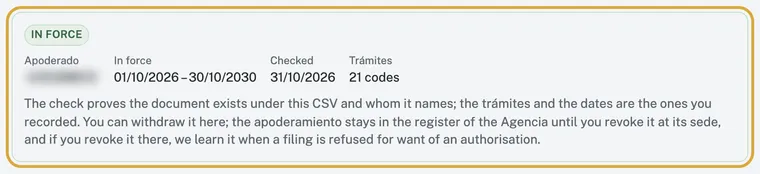
Settings › Filing in your name, with the authorisation in force. A capture of the application, taken again with every version.
If something does not add up
The Sede says «Notificación Telemática»
That state belongs to the notifications trámite alone and waits for the apoderado's confirmation at the Sede, which Trimestria makes by hand; the filing trámites do not need it. In Settings › Filing in your name, beside «In force», you see how it stands: «Notifications: we confirm them within one working day» while it waits and «Notifications: confirmed on …» once it is done. If a working day passes with no change, write to us from Help with the CSV.
I want Trimestria to receive the Agencia's notifications as well
That is the trámite GENERALNOT of the list. A power over the notifications of a trámite sends them to you and to the apoderado you name for that trámite, not to a general apoderado. Until Trimestria confirms it at the Sede, the Sede shows it as «Notificación Telemática».
I already have an apoderamiento with my gestor
The two live side by side: one power to your gestor and another to Trimestria, each with its own trámites and its own end date. Granting this one does not withdraw the other, and withdrawing the other does not touch this one.
Afterwards
Trimestria checks the document through its CSV and tells you by e-mail; the power holds from its start date. From then on your returns are prepared as always and filed in the way you choose in Settings: after your confirmation or automatically, with a notice before every send.
Sources
- Agencia Tributaria · Cómo dar de alta un poder para trámites tributarios mediante identificación electrónica · Page updated on
- Agencia Tributaria · Registro de apoderamientos, forma y procedimiento · Page updated on
- Agencia Tributaria · Relación de trámites habilitados para el apoderamiento · No date on the page, read on
We cite the source and the date the Agencia gives, as its terms of reuse ask.