Before you start
- Your Cl@ve, your digital certificate or your DNIe to enter the Sede; if you have none: How to get Cl@ve, even without going to an office.
- For Trimestria to read your notifications, your apoderamiento with the notifications, confirmed: How to grant Trimestria the apoderamiento at the AEAT's Sede. Without it, Trimestria does not see them and you look at them yourself at the Sede.
- Trimestria reads those of the Agencia Tributaria. Those of the Seguridad Social it will read with another power once it starts and tells you: How to give Trimestria the Seguridad Social's power at its Sede. Until then you look at them in its Sede, and those of the other administrations in the DEHú.
The steps
When Trimestria finds a notification, the home says "The Tax Agency has sent you a notification" and the calendar marks the last day to open it. Press See what to do.
Trimestria reads the notifications every day at 07:00 and at 15:00. It does not open them for you: opening one has effects that are yours to decide.
Before opening it, read the notice of the step Open it. Once you open it you are notified at that moment, and the terms start the next day.
If receiving notifications online is obligatory for you, or you chose it, a notification you do not open within ten calendar days is taken as rejected, and the procedure goes on all the same. That is why Trimestria tells you that tenth day.
BOEArticle 43 of Ley 39/2015, in the BOEThe official page explains it with its own screenshots. We link to it rather than copy them. Page updated on Open in the BOEPress Open at the Sede and open it with your identification in one of the two ways:
AEATConsulting notifications at the Sede, in the Agencia's helpThe official page explains it with its own screenshots. We link to it rather than copy them. Page updated on Open at the SedeAEATNotifications in the DEHú, in the Agencia's helpThe official page explains it with its own screenshots. We link to it rather than copy them. Page updated on Open at the SedeGo back to Trimestria. At the next reading it brings the document to the page of the notification: press See the document and read what it asks and which return it is about.
In The term to reply, type the term the document states, choose whether it counts in working days, calendar days or months, and press That is right. If the same notification reached you on paper first, press It reached me on paper first and type that day: Trimestria counts the term from it.
Look at the last day Trimestria counts, in the step Reply.: working days leave out Saturdays, Sundays and national holidays, and a last day that is not a working day moves to the next working day.
Trimestria does not know the holidays of your municipality or of your region. In a term of working days, each of those holidays that falls on a day that would otherwise be a working day makes the term a day longer.
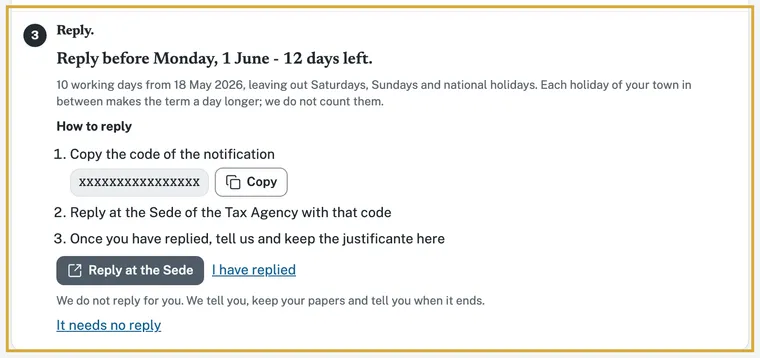
The last day to reply and how to do it. A screenshot of the application in a test environment, taken again with each version. BOEArticle 30 of Ley 39/2015, in the BOEThe official page explains it with its own screenshots. We link to it rather than copy them. Page updated on Open in the BOEReply at the Sede. Copy the code of the notification with Copy and press Reply at the Sede. There paste the code, enter with your identification, fill in the file or the reference and the subject, add the documents with Añadir ficheros and press Presentar. Keep the receipt shown on the screen.
Each file may be up to 128 MB. If the notification names another way to reply, use that one.
AEATReplying to a requerimiento, in the Agencia's helpThe official page explains it with its own screenshots. We link to it rather than copy them. Page updated on Open at the SedeGo back to Trimestria and press I have replied. Add the receipt the Sede gave you and the papers you sent, and press Save. If you do not have the receipt now, you can add it later.
If something does not add up
It is a communication, not a notification
A communication informs and asks for nothing within a term. Read it on its page; there is nothing to reply.
It needs no reply
If the notification asks for no reply, or you dealt with it before, press It needs no reply and choose the reason. The notification is closed with that reason.
The tenth day passed and I did not open it
Open it as soon as you can. If receiving notifications online was obligatory for you, or you chose it, it was taken as rejected on that day and the procedure went on: the document says which term runs and from when.
Trimestria shows no notification
Look in Notifications at which administrations Trimestria reads and at the last reading. If it says your apoderamiento does not include the notifications, or is not confirmed yet, check it; meanwhile, look at the Sede yourself.
I want to appeal what I am notified
On the page to reply at the Sede, press "¿Desea presentar recurso?" and choose the appeal or the claim the notification names. The recurso de reposición is filed within a month from the day after the notification.
Afterwards
The notification stays in Notifications as replied, with the day you gave, the receipt and the papers you sent. If the Agencia answers, it does so with another notification, which Trimestria finds at a reading like this one.
Sources
- Agencia Tributaria · Consulta de notificaciones y comunicaciones en la Sede Electrónica · Page updated on
- Agencia Tributaria · Acceso a notificaciones electrónicas en la DEHú · Page updated on
- Agencia Tributaria · Cómo contestar requerimientos o presentar documentación relacionada con un documento recibido de la AEAT · Page updated on
- BOE · Ley 39/2015, del Procedimiento Administrativo Común, artículo 43, práctica de las notificaciones a través de medios electrónicos · Page updated on
- BOE · Ley 39/2015, del Procedimiento Administrativo Común, artículo 30, cómputo de plazos · Page updated on
- BOE · Ley 58/2003, General Tributaria, artículo 223, plazo del recurso de reposición · Page updated on
We cite the source and the date the Agencia gives, as its terms of reuse ask.