Before you start
- A filed return that is recorded in Trimestria: by its channel, by your browser or recorded back from the Sede.
- The entries of the period entered and confirmed: the comparison rests on your books today.
- To know whether the Agencia has required anything of you about that return: with a requirement the correction is answered inside its answer.
The steps
Go to Returns and open the return. If your books changed after it was filed, its page says so. Quarterly corrections that can be prepared here are flagged on the home and the calendar too; the 390's is seen only on its page.
On the 303 the comparison comes out row by row. Press See what changed and below stay the entries that came in, changed or were removed. In Expert mode the casillas that move are shown too; on the other modelos the block says the difference in plain words.
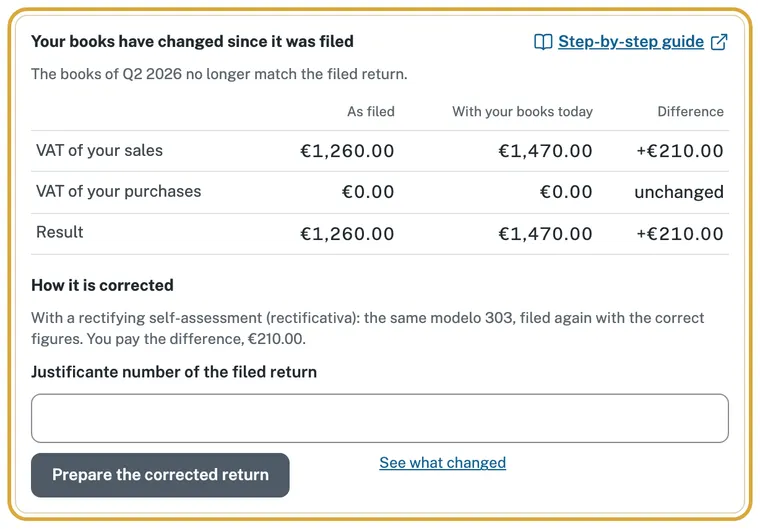
The correction block of a filed modelo 303. A capture of the application in a test environment, retaken with every version. Read How it is corrected: each modelo takes a different way.
AEATThe rectificativa of the 303, in the Agencia's practical VAT manualThe official page explains it with its own screenshots. We link to it rather than copy them. Page updated on Open at the SedeBOEOrden HAC/819/2024, which gave the modelo 303 its rectificativaThe official page explains it with its own screenshots. We link to it rather than copy them. Page updated on Open in the BOEAEATThe instructions of modelo 130, which has no rectificativaThe official page explains it with its own screenshots. We link to it rather than copy them. Page updated on Open at the SedeAEATThe instructions of modelo 111The official page explains it with its own screenshots. We link to it rather than copy them. Page updated on Open at the SedeBOEComplementary and substitute returns, articles 118 and 119 of the ReglamentoThe official page explains it with its own screenshots. We link to it rather than copy them. Page updated on Open in the BOEAEATThe instructions of modelo 390 and its sustitutivaThe official page explains it with its own screenshots. We link to it rather than copy them. No date on the page, read on Open at the SedeLook at what filing late costs. If the correction pays more and the window already ended, the page shows the surcharge that applies today, on what the correction pays on top. The Agencia settles it apart and notifies you: the form has no casilla for it.
Write the justificante of the filed return if the page asks, and answer the refund it names. Then press Prepare the corrected return, or whichever the button names, and review the figures: a return of the same period computed with your books today.
File it the way that return takes.
When you confirm you declare you have received no requirement of the Agencia about this return.
The correction is your own act: you confirm it and you file it, and it is never sent on its own by automatic filing even if you have it on.
If the way is a request for rectification, finish the written request: there is no corrected return to file. For the 130, the 111 and the 115 the page leaves it drafted; for the 303 you draft it yourself. Complete the place and the account where missing, gather what supports it and file it at the Sede.
Wait for the Agencia to accept it. Until then the later drafts and the 390 rest on what you filed. The page of the return says so.
If something does not add up
What if I filed the return outside Trimestria?
If you filed it at the Sede and recorded it here, it counts as recorded and is corrected here. If it was never recorded, it is corrected in the Agencia Tributaria's Sede Electrónica, where the same procedure is. The exception is a 130 of a period your books cover and whose filed figures you recorded: it is still offered while that year's Renta is not filed.
What if the error is VAT I charged another taxpayer unduly?
That 303 is not corrected with a rectificativa. You draft the request for rectification yourself and it is filed at the Sede, under article 129 of the Reglamento.
The rectificativa of the 303 and its exclusions, in the practical VAT manual
What if it is a 349?
A whole record left out goes in a complementaria. A base declared wrong for an operator already declared goes in the record of rectifications of the 349 of the period the modification was notified to the recipient; where nobody notified it, the Orden sets no period. Anything else is modified in the Agencia's service or with a sustitutiva.
The record layout of the 349 with its three ways, in Orden EHA/769/2010
What if it is a 180 or a 190?
A recipient who was left out is added with a complementaria if the original went by file, or in the web form itself. With a figure declared wrong by file, first save the identifying number of the declaration. Give it the baja in "Consulta y bajas de declaraciones" and upload the sustitutiva with that number. Between the baja and the acceptance the Agencia holds none in force. Filed by the web form, everything is corrected in place, with no baja.
How a filed informative return is modified, in the Agencia's help
What if the Agencia already required something of me about this return?
The correction is answered inside the answer to the requirement; it is not prepared here. The guide When the Agencia Tributaria sends you a notification walks through how to answer.
What if a rectificativa of that period already exists?
A second one can be prepared if the books changed again. Going to the Sede are a third one, one over a rectificativa recorded there and a second one where the original return asked money back; a first rectificativa that asked it is prepared, and the page asks whether it arrived. Also one over a refund that carried balances to compensate from earlier periods.
What if the refund I received is not the one the page shows?
Then the way is the Sede. The question can name the filed return itself, not only an earlier correction.
What if the 303 is of a period the application does not carry?
The rectificativa of the 303 exists from the third quarter of 2024, but Trimestria prepares it only for the years whose rules it carries. An earlier 303 is corrected with the usual pair, complementaria or request, and a later one the page does not offer, at the Sede.
What if the books changed but the result did not?
The page says so and Trimestria does not prepare that correction. The rectificativa of a 303 with the same result can be filed at the Sede.
How is the surcharge computed and when is it reduced?
Inside the window there is no surcharge. Past the window it is 1 % plus 1 % more for each full month of delay, 15 % once twelve months have passed, with late interest from then on. The surcharge is 25 % less if you pay what is owed at filing and the surcharge inside the window the Agencia notifies.
The late-filing surcharge, article 27 of the Ley General Tributaria
What if the correction pays nothing more?
It carries no surcharge. A return that pays nothing filed late can carry a fixed penalty, half of the one of article 198.1 of the Ley General Tributaria. Whether it is imposed and how much is the Agencia's to decide.
The penalty of a late return with nothing to pay, article 198 of the Ley General Tributaria
What if more than four years have passed?
They are counted from the day after the filing window ended. To recover a payment made late the claim can still be live, because its four years are counted from the day after the payment. It is asked for at the Sede.
Afterwards
When the Agencia accepts the correction it becomes the return in force: it stays in Returns with its receipt, and the later drafts and the 390 are computed again on it. If the way was a request for rectification, it stays pending the Agencia's answer - of up to six months, after which it can be taken as refused - and if it comes, you find it in your notifications inbox when you gave Trimestria the reading of them, or at the Sede if not.
Sources
- Agencia Tributaria · Modelo 303. Autoliquidación rectificativa, capítulo 8 del Manual práctico de IVA 2025 · Page updated on
- BOE · Orden HAC/819/2024, de 30 de julio, por la que se aprueba el modelo 303 y se adapta a la autoliquidación rectificativa · Page updated on
- Agencia Tributaria · Modelo 130 - Instrucciones · Page updated on
- Agencia Tributaria · Modelo 111 - Instrucciones · Page updated on
- BOE · Reglamento General de las actuaciones y los procedimientos de gestión e inspección tributaria, artículos 118 y 119, las declaraciones complementarias y sustitutivas · Page updated on
- BOE · Orden EHA/769/2010, de 18 de marzo, el diseño de registro del modelo 349 con la complementaria, la sustitutiva y el registro de rectificaciones · Page updated on
- Agencia Tributaria · Modificar declaraciones informativas · Page updated on
- Agencia Tributaria · Modelo 390 - Instrucciones 2025 · No date on the page, read on
- BOE · Ley 58/2003, General Tributaria, artículos 27 y 198, el recargo por presentación extemporánea y la sanción de una declaración sin perjuicio económico · Page updated on
We cite the source and the date the Agencia gives, as its terms of reuse ask.