Before you start
- Your Cl@ve, your digital certificate or your DNIe to enter Import@ss, the portal of the Seguridad Social; if you have none: How to get Cl@ve, even without going to an office.
- Your contribution base and, if you pay the tarifa plana, the day it ends: the resolution of your alta at the Seguridad Social states them.
- The books of the year up to date: Trimestria compares your base with what they say.
The steps
Open Settings › Seguridad Social. Under Contribution base in force is the base Trimestria knows: the one you gave or the one it read from your application for the alta. If it does not know it, type the Monthly base and the day In force from and, if you pay the tarifa plana, its last day in I pay a reduced cuota (tarifa plana) until. Press Save.
What you give there stays in Trimestria. Nothing is sent to the Seguridad Social.
While you pay the tarifa plana, Your contribution base says until which day: until then the band of your income does not change what you pay. The tarifa plana is a cuota of 80 euros a month for the twelve full calendar months after the alta, plus the intergenerational equity mechanism: 88.64 euros in 2026.
TGSSThe tarifa plana, in the Import@ss guideThe official page explains it with its own screenshots. We link to it rather than copy them. No date on the page, read on Open at the Seguridad Social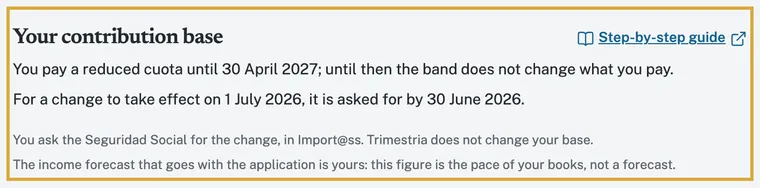
Your contribution base while you pay the tarifa plana. A screenshot of the application in a test environment, taken again with each version. If in the following twelve months your net income will stay below the minimum interprofessional wage of each year they cover, ask for twelve more months of tarifa plana before the first ones end, with the declaration that your expected income will be lower. If you do not ask, at the end you pay the cuota of your contribution base.
The first twelve months of tarifa plana are not regularised afterwards. Those of the extension are, in the year your net income goes above the minimum wage.
BOEArticle 38 ter of the Estatuto del trabajo autónomo, in the BOEThe official page explains it with its own screenshots. We link to it rather than copy them. Page updated on Open in the BOEOnce you pay the cuota of your base, read Your contribution base: Trimestria says which band your income is in at the pace of your books and whether your base is within, below or above the bases of that band.
BOEArticle 308 of the Ley General de la Seguridad Social, in the BOEThe official page explains it with its own screenshots. We link to it rather than copy them. Page updated on Open in the BOEIf you decide to change the base, look at the deadline Trimestria gives you: "For a change to take effect on…, it is asked for by…". The base can be changed up to six times a year, taking effect on 1 March, May, July, September and November and on 1 January, depending on when you ask.
BOEArticle 45 of the Reglamento general sobre cotización, in the BOEThe official page explains it with its own screenshots. We link to it rather than copy them. Page updated on Open in the BOEAsk for the change in Import@ss. Enter your personal area and open the service Base de cotización y rendimientos: give the monthly net income you expect, look at the band it corresponds to, choose your base, check the details and sign the application. You can download the receipt of the procedure.
The income forecast that goes with the application is yours. Trimestria's figure is the pace of your books, not a forecast, and Trimestria does not change your base.
TGSSChanging the contribution base, in the magazine of the Seguridad SocialThe official page explains it with its own screenshots. We link to it rather than copy them. Page updated on Open at the Seguridad SocialGo back to Trimestria and type in Settings › Seguridad Social the new Monthly base and, in In force from, the day it takes effect. Until that day, Your contribution base recalls the change you asked for.
If something does not add up
Trimestria does not compare my base
The page says why. The comparison is made with books in estimación directa; in estimación objetiva, without your profile or without the tables of the year, there is no comparison. While a full month of books or the tax value of an entry is missing, the comparison waits.
I want to leave the tarifa plana
You can give it up in Import@ss with the service Renuncia a tu tarifa plana. Giving it up takes effect on the first day of the month after the one you communicate it.
The regularisation asks me to pay
Pay the difference by the last day of the month after the one the result is notified to you: within that term it carries no surcharge and no interest. For the following years, fit the base to your expected income with steps 5 and 6.
Article 308 of the Ley General de la Seguridad Social, in the BOE
Afterwards
Trimestria keeps comparing your base with your books as you record. When your base falls outside the band, the home tells you and the calendar marks the last day to ask for the change that takes effect soonest.
Sources
- Seguridad Social · Import@ss, Trabajo Autónomo - Guía práctica · No date on the page, read on
- Seguridad Social · ¿Cómo cambio mi base de cotización con el nuevo sistema de autónomos? · Page updated on
- BOE · Ley 20/2007, del Estatuto del trabajo autónomo, artículo 38 ter, reducciones por inicio de una actividad · Page updated on
- BOE · Ley General de la Seguridad Social, artículo 308, cotización y regularización de los autónomos · Page updated on
- BOE · Real Decreto 2064/1995, Reglamento general sobre cotización, artículo 45, cambios de base de cotización · Page updated on
We cite the source and the date the Agencia gives, as its terms of reuse ask.